


Calculator Launcher
4.13.82K Reviews
App Specs
- Version
- 3.20.0
- Updated On
- License
- Free
- Downloads
- 1,000,000+
- Developer
- AtomApplications
- Categories
- Tools
- Platform
- Android
Screenshots
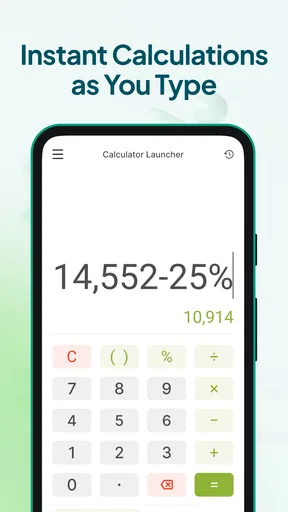
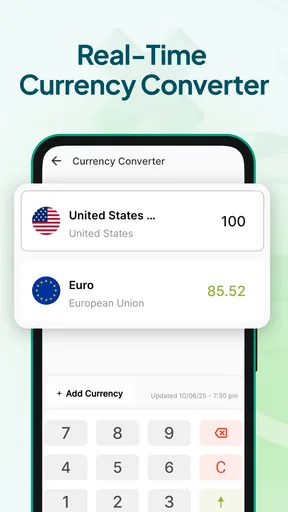
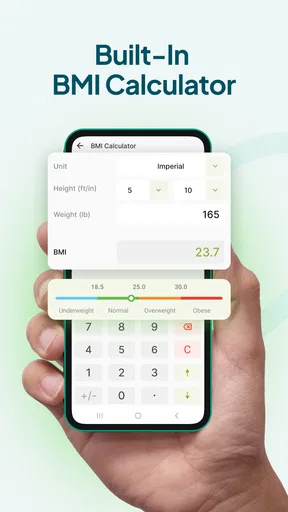
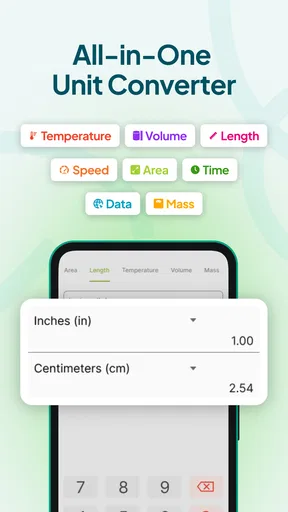

 Analysis by AppCompare
I often notice how much time a simple calculation can waste. I unlock my phone, search for the calculator, open the wrong screen, or switch between an app and a browser while trying to convert a measurement. None of those steps is difficult, but together they interrupt whatever I was doing. Calculator Launcher is designed around removing that small, repeated annoyance. Instead of treating calculation as a destination, it puts quick arithmetic and unit conversion closer to the moment when I need them.
That focus makes it different from a full-featured calculator aimed at advanced mathematics. It is a free tools app from AtomApplications, and its appeal is mainly practical: open it quickly, enter a value, and get on with the task. I found it most convincing when I judged it by time saved during ordinary phone use, rather than by the number of specialist functions it might offer.
Why a separate calculator launcher can be useful
The usual phone calculator is perfectly adequate when I already know where it is. The problem is that everyday calculations rarely arrive at a convenient moment. I might be checking whether a discount is worthwhile while shopping, dividing a restaurant bill, estimating paint for a room, or converting a recipe from one measurement system to another. In each case, the calculation is secondary to the main activity, so a long route to the calculator feels disproportionate.
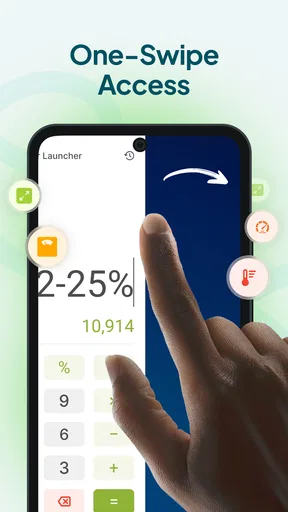
Calculator Launcher addresses that interruption by presenting itself as a quick-access utility rather than something I need to browse for. That distinction matters most for people who make several small calculations throughout the day. The individual result may take only a few seconds, but avoiding repeated searching makes the phone feel less cluttered and the workflow more direct.
The app has a 4.1 average from around 15 thousand ratings, with more than a million installs. Those figures suggest that it has found a clear audience among people who want a straightforward calculation tool, not necessarily a complete scientific workstation. It is rated for Everyone, so its intended use is broad and uncomplicated.
I would not choose it simply because I need “a calculator.” Most phones already include one. I would choose it because I want calculation and conversion to be easier to reach. That is the central question: does the launcher save enough effort in my routine to justify keeping another utility available? For frequent small tasks, my answer is generally yes.
The first setup: keep the workflow simple
My advice is to begin with the most common task rather than trying to explore every possible calculation immediately. If I am installing it to help with shopping, I test percentage changes and quick totals. If I am using it for cooking or home projects, I start with unit conversions. This approach makes it obvious whether the app fits my habits instead of turning setup into another chore.
Worth Reading Before You Choose

EA SPORTS FC Mobile 26 Is a Bigger Football Game, but It Takes Time

Flipboard Shows What News Apps Must Do Beyond the Feed

Switching to Android Auto Means Rethinking Your Driving Routine

Google Calendar Makes a Crowded Week Easier to Manage

Ludo King Makes the Most of the Minutes Between Plans

Baby Panda World Brings Quick Play to Modern Phones, but Its Game Library Feels Busy
The useful mental model is to treat Calculator Launcher as a bridge between an idea and an answer. I do not need to prepare a spreadsheet for a single proportion, nor do I need to open a search engine for a basic conversion. I enter the value, check the result, and return to the original task. That sounds modest, but it is exactly where a focused tool can outperform a more complicated alternative.
A good early test is to use it while doing something else on the phone. For example, I can read a product listing, open the launcher for a quick calculation, and then continue comparing items. This reveals whether the access route feels natural on my device. If the app requires too much navigation in my particular setup, its main advantage becomes less important, even if the calculator itself works well.
There is also a useful discipline here: I keep the original quantity and the converted result visible long enough to verify what I entered. Fast tools can encourage fast mistakes. When converting a room dimension or a recipe ingredient, I check the unit before accepting the answer. The app may reduce friction, but it cannot decide whether I meant centimeters or inches, or whether a percentage should be added or subtracted.
Everyday situations where it earns its place
Shopping is one of the clearest examples. Suppose I am comparing two package sizes and one has a temporary discount. I can calculate the reduced price, divide the cost by the quantity, and make a fair comparison without leaving the store page for long. The valuable part is not advanced mathematics; it is keeping a small decision from becoming a chain of app switches.
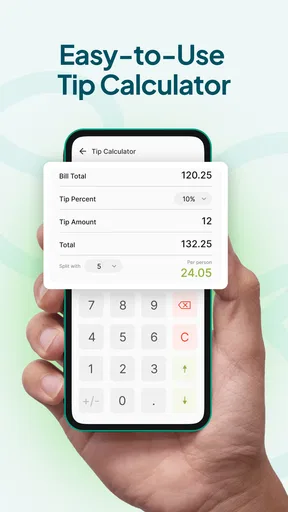
Splitting a bill is another natural use. I can total several amounts, divide the result between people, and add a tip estimate if needed. I still review the final figure before sending a payment request, but the calculation is quick enough that nobody has to wait while I search through folders for the standard calculator.
Home projects benefit from the conversion side. When measuring furniture, flooring, storage, or wall space, I may receive dimensions in one unit while the product information uses another. A launcher that handles quick calculations and conversions helps me compare those numbers in the same place. One non-obvious advantage is that I can convert first and calculate second, rather than mixing units in my head and risking an incorrect total.
Cooking provides a similar workflow. If a recipe serves four and I need six portions, I can multiply each ingredient as I work. When the recipe uses unfamiliar measurements, I can convert them separately instead of relying on rough visual estimates. I would still be careful with ingredients where small changes affect the result, but the app is useful for the routine arithmetic around the recipe.
Travel planning is another practical case. Distances, temperatures, weights, and currencies often appear in different formats. Calculator Launcher is helpful for numerical conversions, but I would not confuse that with live exchange-rate information. For money, the rate and timing matter, so I would use a current financial source when precision is important and use this app for the arithmetic once I have the relevant rate.
Students can also use it for quick checks while studying. It is convenient for verifying a percentage, ratio, or measurement without opening a larger educational tool. However, I would not treat a quick answer as an explanation of the underlying method. Someone learning mathematics still needs to understand the formula and the units, especially when a result looks plausible but the setup is wrong.
Small workflow choices that make it more reliable
One habit I found valuable is separating “capture” from “confirm.” I first enter the numbers exactly as they appear in the source, then I check the operation and unit before using the result. This is especially important when copying figures from a product page or handwritten note. A launcher can make access fast, but deliberate checking prevents speed from becoming careless input.
Another useful approach is to calculate in stages when the task mixes different operations. For example, I might work out a discount first, then add delivery, then divide the total by the number of items. Keeping those stages clear makes it easier to spot a mistaken assumption than entering a long expression all at once. This is a practical trade-off: the app can shorten access, but a little structure improves trust in the answer.
For conversions, I avoid rounding too early. If I am estimating materials, I keep a sensible amount of precision through the intermediate step and round only when I need a purchase quantity. Rounding at the beginning can create a larger error after multiplication. This is not a special feature of the app; it is a better way to use any conversion calculator, and the quick interface makes that workflow easy to repeat.
I also recommend using a second check for decisions with real consequences. A household estimate, a school exercise, or a casual shopping comparison is a good fit. Medication measurements, construction calculations, tax work, or anything safety-critical deserves a more controlled method and independent verification. Convenience should not be mistaken for professional certification.
What friction it removes, and what it cannot remove
The biggest improvement is the reduced distance between noticing a numerical problem and solving it. I do not have to turn a one-line calculation into a separate browsing session. That matters on a phone because context switching is often more annoying than the calculation itself. The app is most successful when it stays in the background of my routine rather than demanding attention.
It also reduces the temptation to use a search engine for simple conversions. Search can return useful answers, but it may introduce irrelevant pages, inconsistent formatting, or extra taps. A focused calculator is easier when I already know the value and the kind of conversion I need. For a quick personal task, that directness feels cleaner.
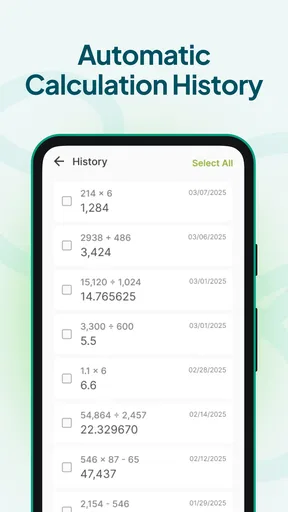
There is a difference, though, between a launcher and a full productivity system. I would not expect it to replace a spreadsheet for repeated calculations, a finance app for budgeting, or a scientific calculator for advanced formulas. If I need saved records, charts, reusable templates, or a detailed calculation history, a broader tool is likely a better choice. Calculator Launcher is strongest at immediate, disposable answers.
Reliability also depends on the way I use it. A result can be mathematically correct while still being unsuitable because the input was wrong, the unit was misunderstood, or the conversion was only an estimate. When I am working quickly, I pay particular attention to decimal separators, negative values, and whether I am calculating a percentage of the original amount or adjusting the amount itself. These are common human errors that no shortcut can fully prevent.
Its broad age rating and free price make it easy to try without a financial commitment. The current version is 3.20.0, and it runs on Android 10 or newer. That operating-system requirement is worth checking before installation, particularly if I am using an older phone. On a compatible device, the app is accessible to a wide range of users, but people who depend on older hardware may need to consider compatibility first.
Who should use it, and who should skip it
I would recommend Calculator Launcher to anyone who repeatedly performs small calculations while shopping, cooking, studying, traveling, or managing household tasks. It is especially suitable for people who dislike digging through an app drawer for a tool they use for only a few seconds. The conversion focus makes it more practical than a bare four-function calculator for mixed-unit situations.
I would also suggest it to users who want a dedicated utility without paying for a premium calculator. Since it is free, the decision is mainly about workflow and compatibility rather than budget. The developer, AtomApplications, has positioned it as a focused tool, and that narrow purpose is a strength when I want speed instead of a crowded interface.
I would skip it if my needs are primarily scientific, financial, or record-based. Engineers, students working with advanced functions, and people who need an audit trail may be better served by specialized calculators or spreadsheets. I would also skip it if my phone’s existing calculator is already instantly accessible and covers every conversion I regularly need. Adding another app only makes sense when it removes a real point of friction.
There is a further trade-off for people who prefer one dependable system app for everything. A separate launcher may feel unnecessary if I rarely calculate anything. In that case, the convenience will not appear often enough to matter. The app is not a universal upgrade; it is a targeted improvement for a repeated habit.
My final view after using it as a daily utility
Calculator Launcher is at its best when a calculation is a brief interruption, not the main task. I like the way it encourages a direct workflow: reach the tool, calculate or convert, verify the result, and return to what I was doing. That makes it more useful than a generic calculator for people who frequently deal with prices, quantities, measurements, and proportions.
My recommendation comes with sensible limits. I would use it for everyday decisions and quick checks, but I would verify anything involving safety, money that matters, or professional measurements. I would also choose a more advanced alternative when I need stored calculations, detailed history, complex functions, or explanations rather than answers.
For the right user, those limitations are not failures; they define the app’s purpose. It is a free, focused tools app from AtomApplications that earns its place by removing repeated small delays. If you often think, “I just need to calculate this quickly,” and then lose time finding the calculator, this is a practical option to try. If that situation almost never happens, your existing phone tools may already be enough.
Pros
- Opens calculations quickly from the launcher or home screen.
- Keeps common arithmetic tools available without switching apps.
- Useful for checking totals while browsing or using another app.
- Simple design makes basic calculations easy to perform.
- Can reduce clutter by replacing a separate calculator shortcut.
Cons
- Limited value if your phone already includes a convenient calculator.
- Advanced scientific or financial functions may be unavailable.
- Launcher integration can feel unnecessary for occasional calculations.
- Results may be harder to review than in a full calculator app.
- Compatibility and setup may vary across Android launchers.
FAQs for Calculator Launcher
What is Calculator Launcher and how does it work?
Calculator Launcher is an Android utility that combines a calculator with a quick-access launcher. After installation, it lets you open the calculator interface and use it as a discreet entry point for accessing selected apps or functions, depending on the version and configuration available on your device. Its main appeal is convenience, although the exact launcher features may vary between releases.
Is Calculator Launcher free to download and use?
Calculator Launcher is generally available as a free download, but users should check the current store listing before installing because pricing, advertising, and optional in-app purchases can change. Some versions may display advertisements or offer extra customization features. Reviewing the permissions, developer information, and recent user feedback is recommended so you understand what the free version includes.
Does Calculator Launcher require special permissions?
The permissions required by Calculator Launcher depend on the features enabled in the particular release. A basic calculator normally needs very little access, while launcher or shortcut functions may request permission to display over other apps, create shortcuts, or access installed applications. Before accepting anything, compare the requested permissions with the app’s purpose and deny access that seems unnecessary.
Can Calculator Launcher hide or protect applications?
Calculator Launcher may provide access-management, privacy, or app-hiding tools in some versions, but these features are not guaranteed on every device or release. Android security restrictions, manufacturer settings, and launcher compatibility can affect how well they work. It should not be treated as a complete security solution; use your device’s screen lock and trusted privacy tools for important personal information.
Will Calculator Launcher work on every Android phone?
Compatibility can vary according to Android version, device manufacturer, screen size, and system restrictions. The calculator itself is likely to work on most supported phones, but overlay controls, shortcuts, or privacy-related functions may behave differently on Samsung, Xiaomi, Google Pixel, and other devices. Check the store’s compatibility notice and keep Android updated before downloading.


